You've booked the trip, but the thought of your precious gaming hardware being tossed around by baggage handlers is enough to cause pre-flight anxiety. Whether you're bringing a portable powerhouse like a Nintendo Switch or a full-size console, packing it correctly is the key to a stress-free journey.
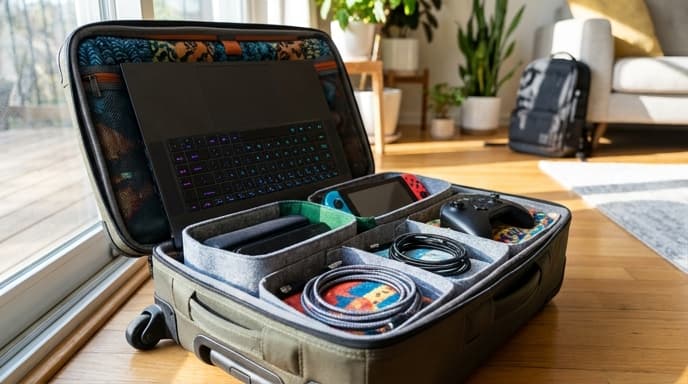
This guide will walk you through the best practices for packing your gaming gear, from choosing the right bag to sailing through airport security. With a few simple steps, you can ensure your equipment arrives safely and ready for action.
Carry-On vs. Checked Luggage: The Golden Rule
The most important rule is simple: always pack expensive and fragile electronics in your carry-on bag. This includes your console, gaming laptop, handhelds like the Steam Deck, and controllers. Your carry-on stays with you, so it's not subject to the rough handling that checked bags often endure.
Checked bags can be dropped, exposed to extreme temperatures, or even lost. While bulky accessories like power bricks and cables can go in a checked bag if you're short on space, the core components of your setup should never leave your sight.
How to Pack Your Console or Laptop
Properly cushioning your main device is critical. Don't just toss it in a backpack and hope for the best. Follow these steps for a secure setup:
- Find the Right Protection: The best option is a dedicated travel case or a backpack with a padded laptop compartment. If you don't have one, wrap the device in soft clothing like sweaters or t-shirts, making sure all sides are cushioned.
- Disconnect Everything: Unplug all cables, remove any game discs from the console, and detach any removable parts like Joy-Cons from a Switch. Packing a console with a disc inside can damage both the disc and the drive mechanism.
- Use the Original Box (If Practical): If you're traveling by car, the original packaging is perfectly designed to protect your console. However, it's often too bulky for air travel.
- Secure It in Your Bag: Place the wrapped device in the center of your carry-on bag, surrounded by more clothing or other soft items. This creates a buffer zone to absorb any impacts.
Managing Your Cables and Accessories
A tangled mess of cables is not only annoying but can also damage ports and connectors. Keep your accessories organized and safe with these tips:
- Use Cable Ties: Wrap each cable neatly and secure it with a Velcro or reusable cable tie. This prevents tangling and makes setup at your destination much easier.
- Bag Your Accessories: Use small pouches or packing cubes to group related items. Keep your power brick, HDMI cable, and controller charging cable in one bag. This way, you're not digging for a specific cord.
- Protect Your Controllers: Place controllers in a separate, protected part of your bag. Avoid packing them in a way that puts constant pressure on the analog sticks, which can cause drift over time. A hard case for your primary controller is a worthwhile investment.
Navigating Airport Security
Large electronics often need to be screened separately. To make the process smoother, prepare before you get to the front of the line.
Easy Access is Key: Pack your console or laptop in a way that makes it easy to remove from your bag. An outer pocket or the top layer is ideal. Laptops almost always need to be placed in a separate bin. Security agents may also ask you to remove large consoles like a PS5 or Xbox.
Don't Argue: If a security agent asks to inspect your device, comply with their instructions. They are following standard procedures to ensure safety. Having your gear neatly packed can often speed up any secondary inspections.
Frequently Asked Questions
Can I bring a full-size console like a PS5 in my carry-on?
Yes, you can. As long as it fits within your airline's carry-on size and weight limits, it's permitted. However, be prepared to remove it from your bag for security screening.
Do I need to worry about batteries?
Lithium-ion batteries, found in controllers and handheld consoles, have specific regulations. They are generally allowed in carry-on luggage but may be restricted in checked bags. It's another strong reason to keep all your core electronics with you in the cabin.
Will the X-ray scanner damage my console?
No, the X-ray scanners used at airport security checkpoints will not harm your electronic devices or the data stored on them.
Key Takeaways
- Always pack expensive electronics like consoles and gaming laptops in your carry-on luggage.
- Use a padded case or wrap your device in soft clothing for protection.
- Remove game discs and disconnect all cables before packing.
- Organize cables and accessories in separate pouches to prevent tangles and damage.
- Be prepared to remove large electronics from your bag for airport security screening.
Related Reading
- The Traveler’s Guide to Power Adapters for Laptops and Consoles
- How to Use a VPN for Travel and Gaming Abroad
- How to Download and Use Offline Maps for Your Next Trip