You've assembled the perfect gaming PC with powerful components and RGB lighting, but a rat's nest of cables can ruin the entire aesthetic. Good cable management is more than just about looks; it can improve airflow inside your case, leading to cooler temperatures, and it makes cleaning and upgrading components much, much easier.
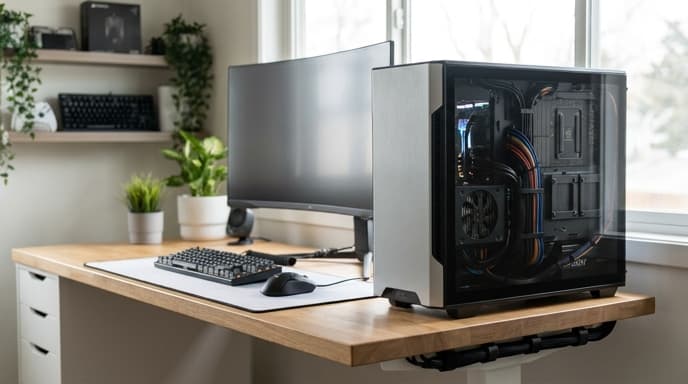
Tackling that cable spaghetti might seem daunting, but with a few simple tools and a clear strategy, you can achieve a clean, professional-looking setup.
Essential Tools for Cable Management
You don't need a lot of expensive gear. Most of what you need can be found for cheap online or at a hardware store.
- Velcro Straps or Zip Ties: Reusable velcro straps are fantastic for bundling cables you might need to change later. Zip ties offer a more permanent, tighter hold.
- Flush Cutters: If you use zip ties, a pair of small flush cutters will let you snip the ends off cleanly without leaving sharp edges.
- Cable Sleeves or Raceways: A fabric cable sleeve can bundle all the cables running from your PC to your monitor into one neat tube. Adhesive cable raceways can be stuck to the underside of your desk to hide cables completely.
- Double-Sided Tape or Adhesive Mounts: Perfect for sticking power strips and USB hubs out of sight, like on the back of your desk.
Managing Cables Inside Your PC Case
A clean interior is all about planning your routes. Modern PC cases have many features to help with this.
- Plan Ahead: Before you plug anything in, think about where each cable needs to go and what the most direct, hidden path is.
- Use Routing Channels: Look for cutouts and channels in your case's motherboard tray. These are designed for you to pass cables through to the back of the case.
- The Back Panel is Your Friend: The space behind the motherboard tray is your primary workspace. Route as many cables as you can through here. This is where you'll bundle excess length and tie everything down.
- Start with the Big Cables: Route your large, stiff power supply cables first, like the 24-pin motherboard power and the CPU power cable. Then, work your way down to smaller ones like fan cables and front panel connectors.
- Bundle and Tie Down: As you route cables along the back, group them together with velcro straps or zip ties. Use the anchor points built into your case to secure these bundles so they lay flat. This makes it possible to put the side panel back on.
Taming the Desk Spaghetti
Once the inside of your PC is clean, it's time to tackle the mess behind it.
- Centralize Your Power: Mount a power strip to the underside or back of your desk. This gets it off the floor and acts as a central hub for all your plugs, meaning only one cable needs to run to the wall outlet.
- Bundle and Sleeve: Group the cables running from your peripherals (keyboard, mouse, headphones) and your monitor (power, display) together. A fabric cable sleeve is a great way to combine them into one thick, clean-looking cable.
- Go Under, Not Over: Use adhesive cable clips or a cable raceway (a plastic channel) to run cables along the underside of your desk. This keeps them completely out of sight.
- Manage Excess Length: Don't let long cables dangle. Loop up the excess length and secure it with a velcro strap, then tuck the bundle away under the desk.
Frequently Asked Questions
Does cable management actually improve airflow?
Yes, especially in smaller cases. Large bundles of cables can obstruct the path of air from your intake fans to your hot components like the CPU and GPU. A clean interior allows for more efficient cooling.
How tight should I make zip ties?
Tight enough to hold the cables securely, but not so tight that you risk damaging the cable's insulation. You shouldn't see the zip tie pinching or deforming the cables.
What's the best way to start if I'm overwhelmed?
Start small. Begin by just managing the cables on top of your desk. Then, tackle the ones underneath. Finally, when you have more time, open up your PC and work on the interior. You don't have to do it all at once.
Key Takeaways
- Good cable management improves aesthetics, airflow, and makes maintenance easier.
- Use tools like velcro straps, cable sleeves, and adhesive mounts to organize your setup.
- Inside your PC, route cables through the back panel and use built-in channels and tie-down points.
- For your desk, mount a power strip out of sight and use raceways or sleeves to hide peripheral cables.
- Start with the big cables first and work your way down to the smaller, more flexible ones.
Related Reading
- How to Check Your PC's CPU and GPU Temperatures
- A Safe Guide to Cleaning Your Mechanical Keyboard
- How to Set Up a Second Monitor for Your Gaming PC